

Best Claude skills for video
Pick a Claude skill by the video you need to ship. Each one below is a directory entry pinned to a public commit; check what runs on your machine before the first render.
The shortlist
Ordered by use case, not by a score.
Best for Product videos

huashu-motion
alchaincyfSkill
- You get
- Product video with composed audio
- Why it fits
- Builds the video with a local motion runtime, adds composed audio, and opens a browser editor so you can revise a specific frame instead of re-rendering from a new prompt.
- Check first
- The motion runtime runs locally. Review its dependencies at the pinned commit before the first render.
Best for Vertical explainers

papercut-explainer
0xS4N4TGSkill
- You get
- Vertical explainer with timed captions
- Why it fits
- Coordinates nine skills and a Remotion library to produce vertical explainers with layered paper scenes and captions timed to the narration.
- Check first
- It relies on nine skills working together. Read Remotion’s own license terms before commercial use.
Best for Short films
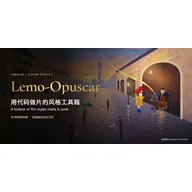
Lemo-Opuscar
lemomo-aiSkill
- You get
- Short film in a documented style
- Why it fits
- A code-driven film toolkit with 59 documented styles, writing guides and rendering tools, so you can choose a look before the agent starts building scenes.
- Check first
- The skill sits inside a plugin folder with rendering tools. Review those tools and where they write output.
Best for 3D explainers

Machine Skill
AirsupHQSkill
- You get
- Interactive 3D HTML, optional video capture
- Why it fits
- Creates interactive 3D machine explanations in standalone HTML with small physics models. Video capture is optional, so it suits teams that also want the interactive page.
- Check first
- The main output is an HTML page; video is a capture of it. Confirm that matches what you need to ship.
Pick by the video you need to ship
Start from the output, not the tool. A product video, a captioned vertical explainer, a styled short film and an interactive 3D explainer need different scene setups, so each skill above covers one of them. Install one skill at a time and render a short test before a full project.
Check what runs on your machine
A skill is a folder of instructions, often with scripts. Claude loads it from a SKILL.md file, and these video skills then call rendering tools such as a Remotion library or a local motion runtime. Read the scripts at the pinned commit, keep renders in a test folder, and follow the current Claude Code skills documentation for where skills live.
How this list was chosen
Every entry had to meet all four checks. AgentSkillsDir records sources; it does not certify output quality.
- Video outputThe entry’s own listing describes producing video, or a video capture option.
- Pinned sourceEach entry links a SKILL.md at a public commit, with its license recorded.
- Loads as a skillPackaged as a SKILL.md skill folder that Claude Code can load.
- Ordered by use casePositions follow the type of video, not ratings or download counts.
Not run yet. AgentSkillsDir has not rendered sample videos with these skills, so no render times or sample clips are published here.
Keep exploring
Open a skill page for its pinned source and setup. These links cover the next step after choosing.
- Browse all skills: Compare every source-linked skill in the directory.
- Install Claude Code skills: Choose folder, plugin or CLI installation and review trust before running.
- earshot: An MCP server that checks audio timing against video, if your render needs a sound pass.
- Best MCP servers for Claude Code: Add tools to Claude Code itself; a different job from video skills.
FAQ
What are Claude skills for video?
They are skill folders, a SKILL.md file plus scripts, that tell Claude how to produce video with code-based tools such as a Remotion library or a local motion runtime. The skill supplies the instructions; rendering happens with the tools it names, on your machine.
Which Claude skill should I use for video?
Match the output: huashu-motion for product videos, papercut-explainer for vertical explainers with timed captions, Lemo-Opuscar for short films in a chosen style, and Machine Skill for interactive 3D explainers you can also record.
Can these skills edit footage I already recorded?
Their listings describe building new videos from code and scenes; huashu-motion adds a browser editor for revising frames in its own output. None of the four listings describes cutting recorded footage, so check each skill’s source for the inputs it accepts.
Are these video skills safe to install?
Listed does not mean audited. Each is pinned to a public commit, and AgentSkillsDir has not run them in your environment. Read the scripts and rendering dependencies before installing, and run the first render in a test folder.
Reference: https://code.claude.com/docs/en/skills
These selections are organized by task, without invented ratings, search volumes or compatibility-test results.